V2rayTUN is a powerful VPN client for iOS, Android, Windows and macOS with TUN mode that routes all device traffic through VPN. Supports VLESS, VMess, Trojan and Shadowsocks. Great for gaming, VoIP calls and hotspot sharing.
Copy a Configuration
Copy a working VLESS key from our list below, or get a personal subscription from our Telegram Bot.
Import
Open V2rayTUN. We highly recommend enabling TUN Mode (the main toggle on the screen) so the VPN tunnel covers all your apps. Then import using one of these methods:
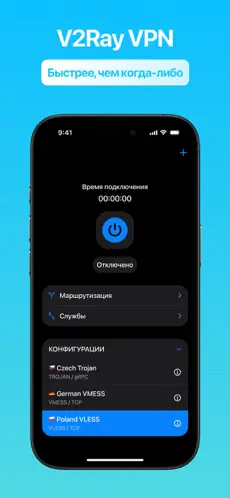
- Clipboard — copy a VLESS link, tap "+" → "Import from clipboard".
- QR Code — tap the scanner icon and scan the code from your computer screen.
- Subscription URL — paste your subscription link to load all servers. Pull-to-refresh to update them.
- Deep Link — tap a v2raytun://import/ link to auto-import the profile directly.
Connect
Select the server and tap connect. Allow VPN permissions if prompted.
FAQ
V2rayTUN is not connecting, what should I do?
Try a different server from the list. Switch routing mode from "Proxy" to "Global". Make sure no other VPN app is active. On Android, disable battery optimization for V2rayTUN.
What is TUN mode?
TUN mode captures all device traffic, including apps that ignore system proxy settings (games, VoIP). Enable it in settings for maximum privacy. If TUN doesn't work on Android, try enabling gVisor in V2rayTUN settings.
 افتح في Happ
  افتح في Hiddify
  افتح في V2rayNG
  افتح في V2rayTUN